Month-end close review
Checks every item in the client’s “what closed means” list against QuickBooks: reconciliations, uncategorized balances and tasks marked done.
The Close Agent runs skills against each client’s own written instructions and their QuickBooks Online data. What isn’t done becomes a task. It only reads QuickBooks, and it runs on your firm’s own AI key.
A run is one skill, for one client, for one period. It’s triggered on a schedule (for example, the day after your close deadline) or by someone on your team clicking Run.
The agent reads the skill, the client’s notes (“what closed means” for them) and the period’s tasks, then queries their QuickBooks data and reports.
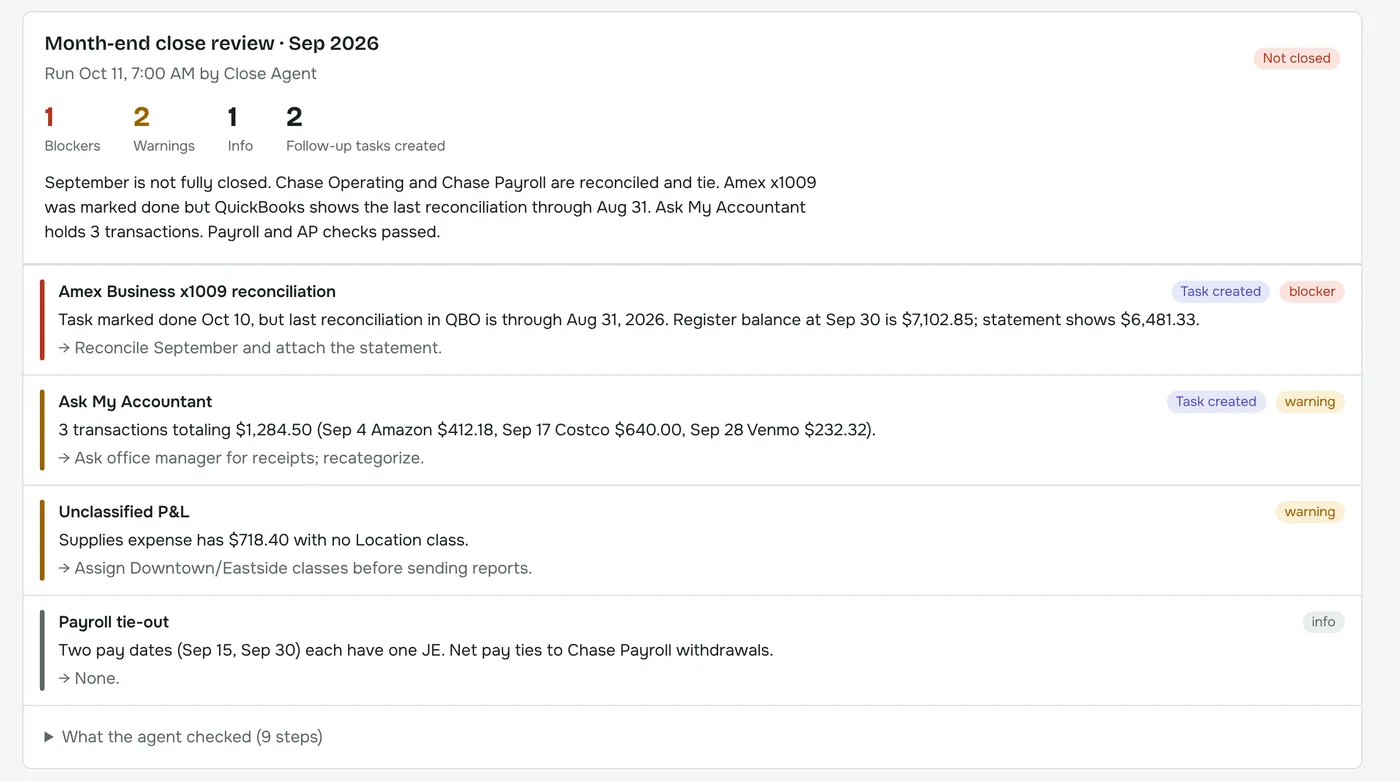
It writes a short report: closed or not closed, plus each finding as a blocker, warning or info item, with the evidence and a recommended fix.
Findings that need action become tasks on the client’s project, assigned to the right person, so nothing lives only in a report.
A skill is a plain-language set of instructions. Use the ones in the library, tweak them, or write your own. Skills are versioned, so you can see what changed and when.
Checks every item in the client’s “what closed means” list against QuickBooks: reconciliations, uncategorized balances and tasks marked done.
Verifies every bank and credit card account is reconciled through month-end.
Flags stale bills and receivables, possible duplicate bills and unapplied payments.
Matches payroll journal entries to the pay dates in the client’s notes.
Compares sales tax payable at quarter end to the amount filed.
Write a new skill in plain language for any check your firm repeats every month.
An admin adds your firm’s API key in AutoZonBooks. Keys are encrypted at rest and only the last four characters are ever shown again.
| Kind of run | Rough cost |
|---|---|
| Small check (one account, short notes) | ~$0.10–0.50 |
| Month-end close review, typical client | ~$0.50–1.50 |
| Busy client with lots of activity | a few dollars |
Rough, illustrative ranges, not a quote. Cost depends on the model you choose, your provider’s current prices, and how much data and how many notes a client has. Each run in AutoZonBooks shows its own token count and estimated cost, and your provider’s bill is the source of truth.
Each client’s QuickBooks Online connection is used read-only. The agent can run queries and pull reports, and that’s all. It can’t create, edit, void or delete anything in the books.
Read client notes and tasks · run QuickBooks queries · pull reports like the balance sheet and P&L · write findings · create follow-up tasks in AutoZonBooks.
Create, edit or delete transactions, bills, journal entries or anything else in QuickBooks.
No. It checks whether the close is done the way the client’s instructions describe, and tells you what isn’t. Your team still does the work and makes the decisions.
Your team writes them on each client’s “Instructions & notes” tab: which accounts to reconcile, payroll dates, anything specific to that client. The better the notes, the better the checks.
As often as you set it: monthly after your close deadline, quarterly for sales tax, or on demand from the client’s Close agent tab.
Data goes to the AI provider whose key you use, under your firm’s agreement with that provider. Check your provider’s API data policy; at the time of writing, Anthropic, for example, doesn’t train on API data by default.
We’ll run it live on a sample client and walk through the findings.